


UGC Videos: Complete Guide for App Founders (2026)
Last month, I watched a founder spend three weeks coordinating with five different UGC creators. Back-and-forth emails about script revisions. Waiting for "the perfect lighting." One creator ghosted completely after taking the deposit.
Meanwhile, another founder created 10 high-converting UGC videos in two hours using Superscale AI. Same quality, fraction of the cost, zero drama.
That's the reality of UGC video creation in 2026. You can either fight the traditional system or embrace the tools that make it effortless.
What Are UGC Videos?
UGC videos are authentic-looking video content that showcases real people using and talking about products or apps. Unlike polished brand advertisements, these videos feel genuine, conversational, and trustworthy.
For app founders, UGC videos typically show someone discovering your app, demonstrating key features, and sharing the results they achieved. The magic happens because viewers see themselves in the person on screen.
Key characteristics that make UGC videos work:
- Real people (or realistic AI avatars) as presenters
- Casual, unscripted delivery style
- Smartphone-quality production aesthetics
- Focus on personal experiences and outcomes
- Natural settings like homes, coffee shops, or offices
The 2025 data confirms this: 60% of consumers believe UGC represents the most authentic form of marketing content, and 82% of consumers are more likely to purchase from brands that include UGC in their marketing efforts.
Why UGC Videos Dominate App Marketing
Traditional app marketing feels like advertising. UGC videos feel like recommendations from friends.
The trust factor is massive:
- 79% of people say UGC highly impacts their purchasing decisions
- Instagram posts featuring UGC report 70% more engagement than normal paid brand ads
- UGC-based ads achieve 4x higher click-through rates than standard ads
- UGC increases conversions by 161% when included on e-commerce product pages
The cost advantage is even bigger:
- Traditional video ads cost $2,000-5,000 per quality video
- UGC creators charge $150-400 per video with weeks of turnaround
- AI-powered UGC tools like Superscale create videos for under $5 in minutes
But here's what most founders miss: the real power isn't just lower costs or higher trust. It's speed. While your competitors spend months creating and testing a few expensive videos, you can test 50 different approaches and find your winners fast.
The app founders achieving breakthrough growth in 2026 aren't debating whether to use UGC - they're already creating winning videos at scale with Superscale and leaving their competition behind.
UGC Video Examples That Actually Convert
Based on analysis of thousands of successful app marketing videos, these five formats consistently drive downloads:
1. Problem-Discovery-Solution (15-25 seconds)
Hook: "I was spending 2 hours every morning planning my day..."
Discovery: "Then my friend showed me this app"
Demo: Quick screen recording of key features
Result: "Now I'm organized in under 5 minutes"
Why it works: Viewers immediately relate to the problem and want the same solution.
2. Before/After Transformation (20-30 seconds)
Setup: Show chaotic situation (messy finances, disorganized schedule)
Transition: "After using [AppName] for a week..."
After: Clean, organized results with app interface visible
Proof: Specific metrics or achievements
Why it works: Visual proof of transformation is incredibly compelling.
3. Feature Discovery (15-20 seconds)
Hook: "Wait, this app can do WHAT?"
Surprise: Demonstrate unexpected or powerful feature
Value: Show how it solves a common frustration
CTA: "You have to try this"
Why it works: Curiosity drives clicks, surprise drives shares.
4. Social Proof Story (25-35 seconds)
Context: "My productivity coach recommended this..."
Experience: Personal journey using the app
Results: Specific outcomes achieved
Recommendation: "If you're struggling with [problem], try this"
Why it works: Third-party recommendations feel more credible than self-promotion.
5. Day-in-the-Life Integration (30-45 seconds)
Morning routine: Show app being used naturally throughout day
Multiple touchpoints: Different features at different times
Seamless integration: App fits naturally into existing habits
Why it works: Viewers can visualize themselves using the app regularly.
The key insight? All these formats work because they focus on outcomes and emotions, not features and functions. Superscale AI excels at creating these formats because it understands the psychology behind each approach.
How Much Do UGC Videos Actually Cost?
Here's the real breakdown of UGC video costs in 2026:
Traditional UGC Creator Pricing
| Creator Type | Rate per Video | Timeline | Hidden Costs | Total for 10 Videos |
|---|---|---|---|---|
| Micro-creators (1K-10K) | $150-250 | 5-14 days | Revisions, usage rights | $2,000-3,500 |
| Mid-tier (10K-100K) | $250-400 | 3-10 days | Rush fees, platform cuts | $3,500-5,500 |
| Established (100K+) | $400-800 | 2-7 days | Exclusivity clauses | $5,000-10,000 |
The Hidden Costs Nobody Talks About:
- Project management time: 5-10 hours per video coordinating
- Revision rounds: $50-150 per change request
- Usage rights negotiations: Often 25-50% premium
- Platform fees: Most marketplaces take 20-30% cuts
- Failed videos: 30-40% don't meet brand standards
Superscale AI Alternative:
| Plan | Monthly Cost | Exports/Month | Cost per Video | Timeline |
|---|---|---|---|---|
| Starter | $99 | 10 speaking character ads | $9.90 | Minutes |
| Growth | $199 | 20 speaking character ads | $9.90 | Minutes |
| Scale | $399 | 40 speaking character ads | $9.90 | Minutes |
Real math: Creating 20 test videos traditionally costs $3,000-8,000 and takes 2-8 weeks. With Superscale, it costs less than $200 and takes half a day. Even with the starter plan, you can create up to 50 videos, using formats like video hook + demo ad, or a typical slideshow.
The time savings alone changes your entire marketing strategy. Instead of betting everything on 2-3 expensive videos, you can test 20 approaches and scale only the winners.
How to Create UGC Videos with Superscale AI
The old way required scripting, casting, filming, editing, and praying.
Superscale lets you create, test, and scale high-performing (paid) social ads — end-to-end, from idea to export.
Step 1: Add Your App (30 seconds)
Simply paste your App Store URL or website link. Superscale's AI automatically:
- Fetches all product data from your listing or website
- Analyzes your app's features and core value proposition
- Creates a product summary that captures your app's essence
- Saves this context for all future video creation
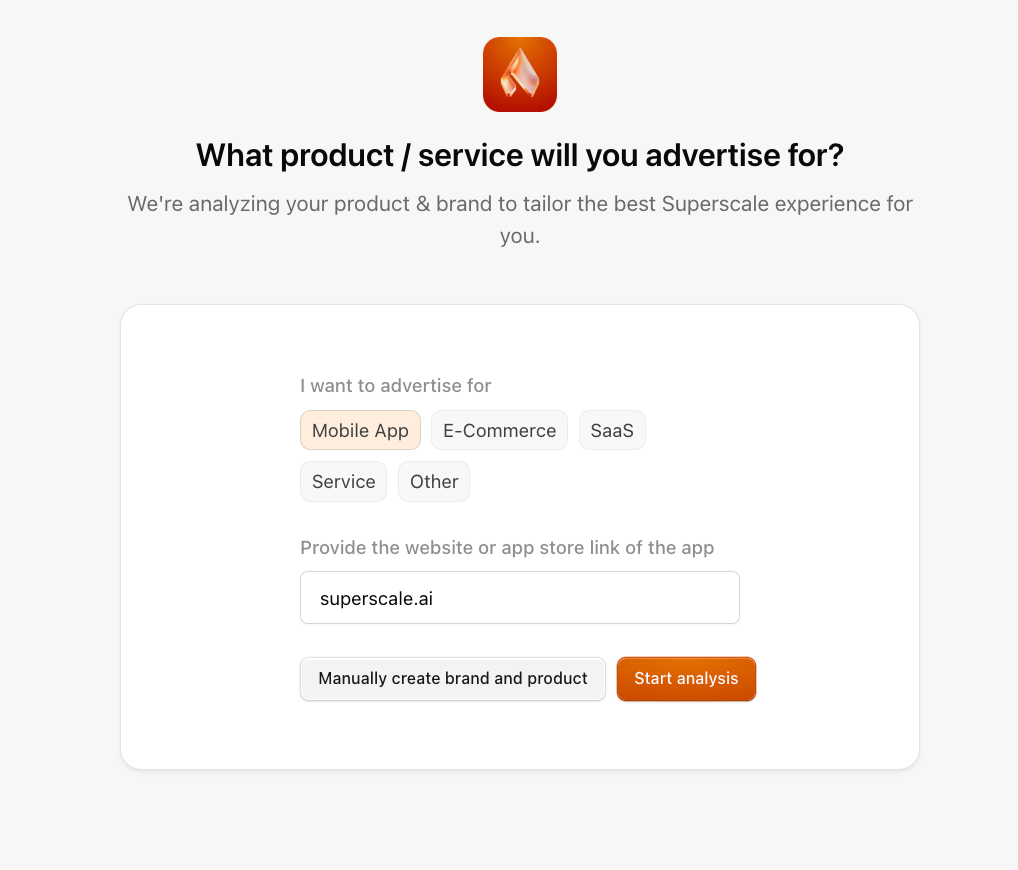
With Superscale’s extensive gallery of proven, high-performing formats, you no longer need to search, script, or prompt; simply pick a template and hit generate. To speed things up even further, upload your app screenshots during onboarding. Superscale will store them and recognize your product’s UI, making future creative production even faster.
Step 2: Creative Inspiration - Two Ways.
If you’re unsure where to begin or want to validate what already works, start here:
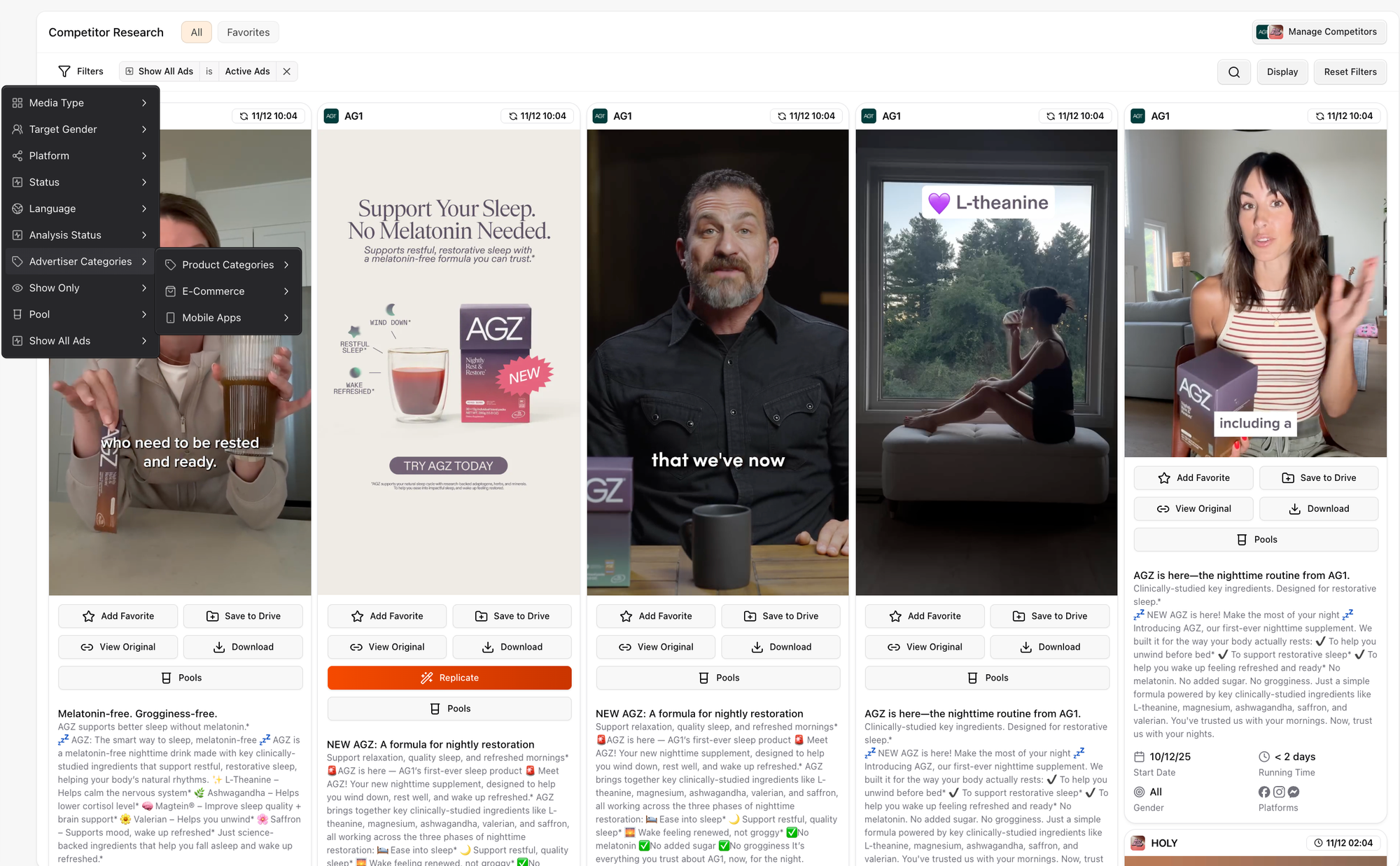
- Head to the Competitor Researcher.
Follow brands in your niche, those with similar business models, or even companies in the same industry but different verticals; plus your direct competitors. See exactly what they’re testing, identify what’s performing, and use those insights to shape your own winning concepts.
- Go to the Generations section.
Tap into concepts that are already trending, performing, and proven to convert. There’s no need to write prompts; simply select a template that sparks your interest, upload your product image or app screenshot (if not yet done in the onboarding process), choose how many variations you want, and Superscale delivers polished, ready-to-use assets in minutes.
Generation via Template Gallery in Superscale
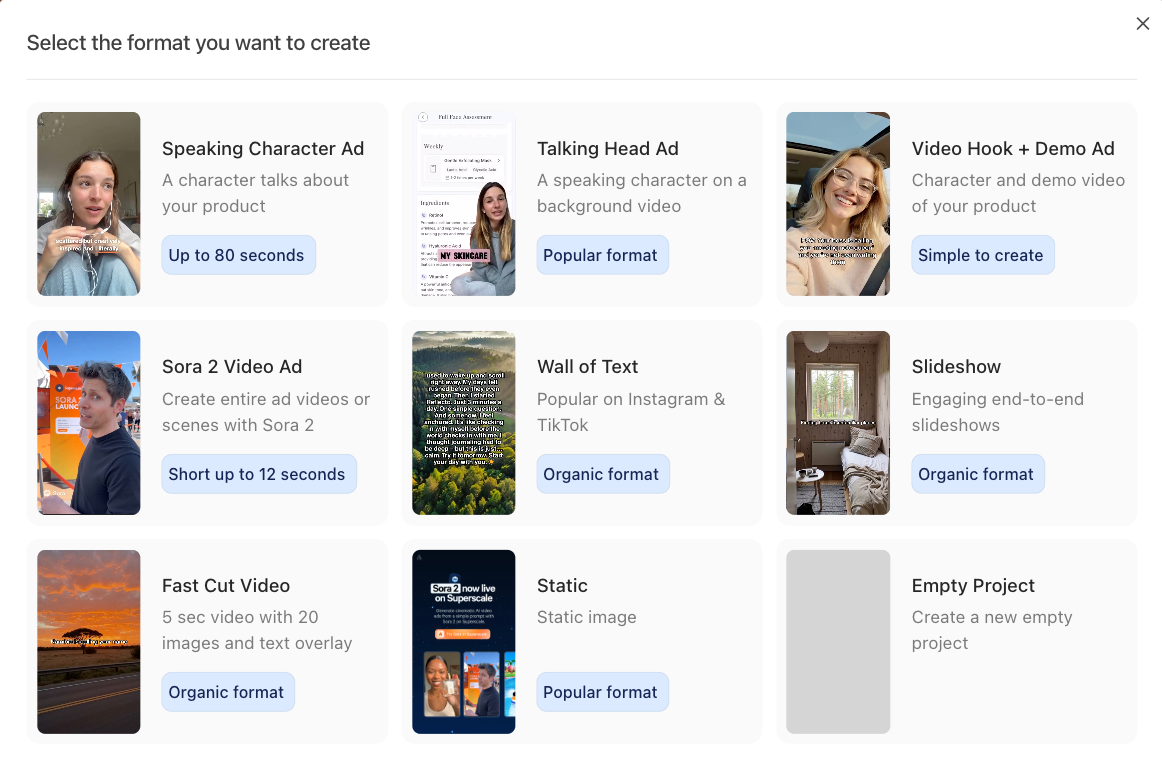
Step 3: Choose Your Format
If you already know what you want to test (or found your inspiration via the competitor researcher), you can start from scratch and craft your own high-performing social ad.
Use Sora 2 for ultra-realistic, highly engaging videos; perfect for short, punchy scripts. Just note that while Sora 2 excels at realism, it’s more limited for rapid iteration or longer narratives, with a maximum duration of 12 seconds.
If you’re aiming for longer scripts, consistent characters, and greater creative control (for example, when launching the same ad in 6+ languages) choose Speaking Character as your format and follow the next steps.
Step 4: Generate
- Select your preferred language from 25+ options Superscale offers
- Choose your character from 300+ Higgsfield characters using filters
- Customize the setting, clothing, or even add your product via prompting
- Add your script and enhance it with tags through ElevenLabs v3 integration
- Select a voice, preview the audio, and refine your script or change the voice until it fits perfectly
- Hit “Create Ad”
Step 4 Customize (5 minutes)
Use the Ad Studio to:
- Splice in product demos: Add your app footage seamlessly
- Adjust timing: Perfect the pacing for your target platform
- Modify text overlays: Customize on-screen messages
- Upload B-roll: Add recordings, images, media that enhance the value of your ad, or create it yourself via "generate scene", you can add snippets with ease to make your ad more dynamic, e.g. add Sora2 or talking heads as separate scenes
- Add captions, music, and adjust speed or volume for precise fine-tuning, then cut and split scenes to fully customize your ad
- Test different CTAs: Multiple call-to-action options
The entire process takes under 10 minutes, and since your app context is saved, creating new videos becomes even faster.
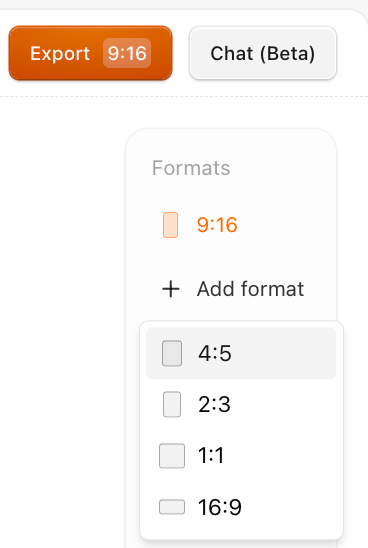
Step 4: Export and Scale
Download videos optimized for each platform with proper sizing, captions, and platform-specific optimizations. Select your preferred format, optimized for meta or google ads, as well as social media:
Every minute you spend coordinating with traditional UGC creators is a minute your competitors could be testing and finding winning creative approaches. Join the app founders who've discovered there's a faster way to dominate their categories with high-converting video content.
UGC Video Script Templates That Convert
While Superscale handles script creation automatically, understanding these proven frameworks helps you guide the AI for better results:
Template 1: The Pain-Solution Bridge
"I used to [specific struggle] every [timeframe]..."
"It was costing me [time/money/opportunity]..."
"Then I found [AppName] and everything changed..."
"Now I [new positive reality]..."
"Download it free and see for yourself"
Template 2: The Discovery Moment
"Wait... this app can [unexpected capability]?"
"I thought [common assumption about category]..."
"But [AppName] actually [surprising truth]..."
"I've been using it for [timeframe] and [specific result]..."
"You need to try this yourself"
Template 3: The Upgrade Story
"I used [old solution] for [task] for years..."
"But [specific limitation/frustration]..."
"[AppName] does the same thing but [key differentiator]..."
"Plus [unexpected bonus benefit]..."
"The switch was worth it - download free"
Template 4: The Social Proof Path
"My [friend/colleague/expert] recommended [AppName]..."
"Honestly, I was skeptical because [common objection]..."
"But after [specific test/trial period]..."
"The results speak for themselves: [concrete outcome]..."
"If you're dealing with [pain point], download this"
When you describe your app to Superscale, mention which template resonates with your audience. The AI will adapt these frameworks to your specific use case and generate natural-sounding scripts.
Platform-Specific UGC Video Strategies
Each platform has different user expectations and algorithm preferences. Superscale automatically optimizes for these differences:
TikTok UGC Videos
Platform characteristics:
- 15-30 second optimal length
- Hook must grab attention in first 0.3 seconds
- Trending audio boosts reach
- Authentic, casual aesthetic preferred
- High completion rates crucial for algorithm
Instagram Reels UGC
Platform characteristics:
- 30-60 second sweet spot
- More polished than TikTok but still authentic
- Strong visual storytelling
- Hashtag strategy important
- Cross-posting to Stories amplifies reach
Facebook/Meta Ads UGC
Platform characteristics:
- Longer form content performs well (30-90 seconds)
- Detailed targeting options available
- Caption text heavily weighted by algorithm
- Video quality can be higher
- Clear value proposition essential
YouTube Shorts UGC
Platform characteristics:
- 15-60 seconds maximum length
- Vertical format essential
- Strong opening hook critical
- Subscribe CTAs effective
- Educational content performs well
Measuring UGC Video Performance
Success with UGC videos comes down to tracking the right metrics and optimizing based on data, not opinions.
Primary Metrics That Matter:
- Cost Per Install (CPI): Your ultimate success metric
- Click-Through Rate (CTR): Indicates hook and thumbnail effectiveness
- Video Completion Rate: Shows content quality and engagement
- Cost Per Acquisition (CPA): Revenue impact of video campaigns
Platform-Specific Benchmarks:
| Platform | Good CTR | Good Completion Rate | Notes |
|---|---|---|---|
| TikTok | 1.0%+ | 45%+ | Thumb-stop rate also crucial |
| 0.8%+ | 40%+ | Story cross-posting boosts reach | |
| 0.65%+ | 35%+ | Detailed targeting improves CTR | |
| YouTube | 0.5%+ | 40%+ | Retention in first 15s critical |
Optimization Signals:
- High CTR + Low Installs: Landing page or app store optimization needed
- Low CTR + High Completion: Hook/thumbnail needs improvement
- High Completion + High CTR + Low Installs: Audience targeting issue
- Declining performance over time: Creative fatigue, need new videos
Why Superscale Beats Traditional UGC Creation
After testing dozens of UGC creation methods, Superscale solves every major pain point of traditional approaches:
Speed Advantage
Traditional: 2-8 weeks from concept to finished video
Superscale: 10 minutes from idea to ready-to-publish video
This speed isn't just convenient - it's strategic. While competitors spend months perfecting one video, you can test 20 approaches and find winners fast.
Cost Efficiency
Traditional: $200-800 per video plus management overhead
Superscale: Under $10 per video, spy competitors if needed +
The savings compound quickly. Testing 50 video variations costs under $100 vs $10,000+ traditionally.
Quality Consistency
Traditional: 30-40% of videos don't meet brand standards
Superscale: Consistent quality with control over all your assets
No more hoping creators understand your brand. Every video aligns with your vision.
Scale Without Complexity
Traditional: Each new video requires finding, vetting, and managing creators
Superscale: Generate videos for new (geo-)markets, audiences, or products instantly
Expanding to new demographics or regions becomes effortless.
Creative Control
Traditional: Limited by creator interpretation and availability
Superscale: Full control over every element
Test radical creative approaches without expensive reshoots.
The platform essentially gives you a team of expert UGC creators available 24/7, at a fraction of the cost, with none of the management headaches.
The app categories being dominated in 2025 all have one thing in common: their founders discovered how to create and test winning video content faster than their competition. See how Superscale transforms app marketing workflows for thousands of successful founders.
Getting Started with UGC Video Creation
The fastest way to see results is to start creating and testing immediately. Here's the proven approach:
Week 1: Foundation Testing (Days 1-7)
Goal: Find your winning format and character
- Create 5 videos using different Superscale formats
- Test each with $50/day budget for 48 hours
- Focus on one core pain point your app solves
- Track CTR and completion rates for each video
- Identify the top 2 performers for scaling
What to test: Different character ages, video formats, and hook styles.
Week 2: Hook Optimization (Days 8-14)
Goal: Perfect your opening 3 seconds
- Take your best-performing video from week 1
- Create 5 variations with different opening hooks
- Keep everything else identical (character, format, CTA)
- Test with same budget split
- Measure thumb-stop and completion rates
What to test: Question hooks vs statement hooks, emotional vs logical appeals.
Week 3: Scale and Expand (Days 15-21)
Goal: Increase budget on winners and test new audiences
- Scale winning videos to $200+/day budget
- Create versions for different platforms (TikTok, Instagram, Facebook)
- Test new audience segments with proven creative
- Monitor for creative fatigue (declining CTR)
- Generate platform-specific variations using Superscale
Week 4: Systematize Success (Days 22-28)
Goal: Build repeatable creative pipeline
- Document what works for your app and audience
- Create content calendar for ongoing testing
- Set up performance tracking and optimization alerts
- Plan creative refresh schedule to prevent fatigue
- Scale successful approaches to larger budgets
Expected outcome: By day 28, you should have 3-5 proven video formats driving consistent installs at your target CPI.
The key is starting immediately. Every day you delay is another day competitors might discover what works for your audience.
Your competitors are either still struggling with traditional UGC creation or they've already discovered the speed advantage of AI-powered video generation. Find out which group you want to be in and transform your app's growth trajectory this week.
Common UGC Video Mistakes That Kill Performance
Even with AI handling the heavy lifting, these mistakes can sabotage your results:
1. Generic Problem Statements
Wrong: "Tired of being unproductive?"
Right: "Tired of ending every day feeling like you accomplished nothing?"
Why it matters: Specific pain points create stronger emotional connections.
2. Feature-Heavy Demonstrations
Wrong: "Our app has 15 productivity features including..."
Right: "I finally stopped missing important deadlines"
Why it matters: Outcomes sell, features don't.
3. Weak Call-to-Actions
Wrong: "Check it out" or "Learn more"
Right: "Download free" or "Try it now"
Why it matters: Specific actions drive measurable results.
4. Wrong Video Length for Platform
Wrong: 60-second videos on TikTok
Right: 15-30 seconds optimized for completion
Why it matters: Platform algorithms favor content that keeps users engaged.
5. Mismatched Avatar to Audience
Wrong: College-aged character for B2B productivity app
Right: Professional-looking person in office setting
Why it matters: Viewers need to see themselves in the presenter.
6. Overly Polished Production
Wrong: Perfect lighting, multiple camera angles, professional studio
Right: Natural lighting, single phone camera, casual setting
Why it matters: Authenticity beats production value in UGC.
Superscale helps avoid these mistakes through built-in best practices and character-matching recommendations.
Future of UGC Video Creation
The UGC landscape is evolving rapidly, and AI-powered creation is leading the transformation:
Emerging Trends for 2065:
- Interactive UGC: Shoppable videos with direct purchase options
- Personalized at scale: AI creating custom videos for different audience segments
- Real-time optimization: Algorithms adjusting video content based on live performance data
- Voice cloning integration: Matching character voices to target demographics
Platform Evolution:
- TikTok: Enhanced shopping integration with UGC content
- Instagram: AI-suggested UGC creation tools for businesses
- YouTube: Shorts monetization driving more creator participation
- Meta: Improved targeting using UGC performance data
Technology Advancement:
- Improved realism: 70% of consumers trust other consumers' reviews and images over professionally produced content
- Faster generation: Real-time video creation and optimization
- Better analytics: Predictive performance modeling for video concepts
- Cross-platform automation: Single creation, multi-platform distribution
Superscale is positioning at the forefront of these trends, continuously improving its AI models and expanding platform integrations.
Frequently Asked Questions
Can AI UGC videos really match human creator performance?
31% of people say that ads featuring user-generated content are more memorable than standard ones, and UGC ads achieve 50% lower cost-per-click than traditional ads on Meta platforms. While human content scores higher on perceived authenticity, the performance gap closes when viewers don't know the creation method. For most app marketing goals, AI UGC performs equal or better.
Do I need to disclose that videos are AI-generated?
Platform policies increasingly require AI disclosure. Research shows transparent disclosure actually increases trust by 24%. Superscale includes compliant disclosure options for all major platforms.
How many videos should I test before finding winners?
Plan to test 20-30 variations to find 3-5 strong performers. With traditional creators, this would cost $6,000-15,000. With Superscale, it costs under $50 (Growth plan covers 25 exports).
What's the ideal video length for app marketing?
Platform-specific optimization: TikTok (15-30s), Instagram Reels (30s), Facebook (30-60s), YouTube Shorts (15-60s). Superscale automatically creates optimal lengths for each platform.
How quickly can I see performance results?
Video performance indicators emerge within 24-48 hours. Strong performers typically show consistent results within 7 days. Full campaign optimization usually takes 30 days of testing and iteration.
Should I completely replace human creators with AI?
Most successful brands use hybrid approaches: AI for volume testing and rapid iteration, human creators for scaling proven winners when authenticity is paramount. Start with 80% AI, 20% human, then adjust based on results.
How do I handle negative comments on UGC videos?
Respond professionally to legitimate concerns, ignore obvious trolls. Negative comments often boost algorithm engagement. Focus on the overall conversion metrics rather than individual comment sentiment.
What budget should I allocate for UGC video testing?
Start with $500-1,000/month for comprehensive testing of 20-40 video variations using Superscale's Growth or Scale plans. Plan to scale winning videos to 3-5x your testing budget once proven.
How often should I refresh my video creative?
Monitor performance weekly. Refresh individual videos when CTR drops 30% from peak performance. Completely refresh your creative bank every 6-8 weeks to prevent audience fatigue.
Can I use Superscale videos for organic social media posts?
Yes, videos work for both paid advertising and organic content. Many brands find organic posting helps validate creative concepts before investing in paid promotion.
Ready to Transform Your App Marketing?
The data is overwhelming: UGC videos outperform traditional marketing, AI creation beats manual processes, and early adopters gain sustainable competitive advantages.
While your competitors debate strategy, you can be testing, learning, and scaling. While they coordinate with creators and wait for revisions, you can generate 20 video variations and identify winners.
The window for easy wins in UGC marketing is closing as more brands discover these tools. But right now, in 2025, you have the opportunity to dominate your app category with authentic, high-converting video content.
Your next steps:
- Start creating your first 5 UGC videos with Superscale today
- Test with small budgets to identify winning formats
- Scale successful videos while continuing to test new approaches
- Build a systematic approach to ongoing content creation
The apps that embrace AI-powered UGC creation now will own their categories while competitors struggle with traditional methods.
The breakthrough app companies of 2025 didn't achieve success by following the old playbook. They embraced the tools that made the competition irrelevant - starting with AI-powered UGC video creation that turns weeks of coordination into minutes of execution.


