The only MakeUGC Review you'll ever need in 2026!
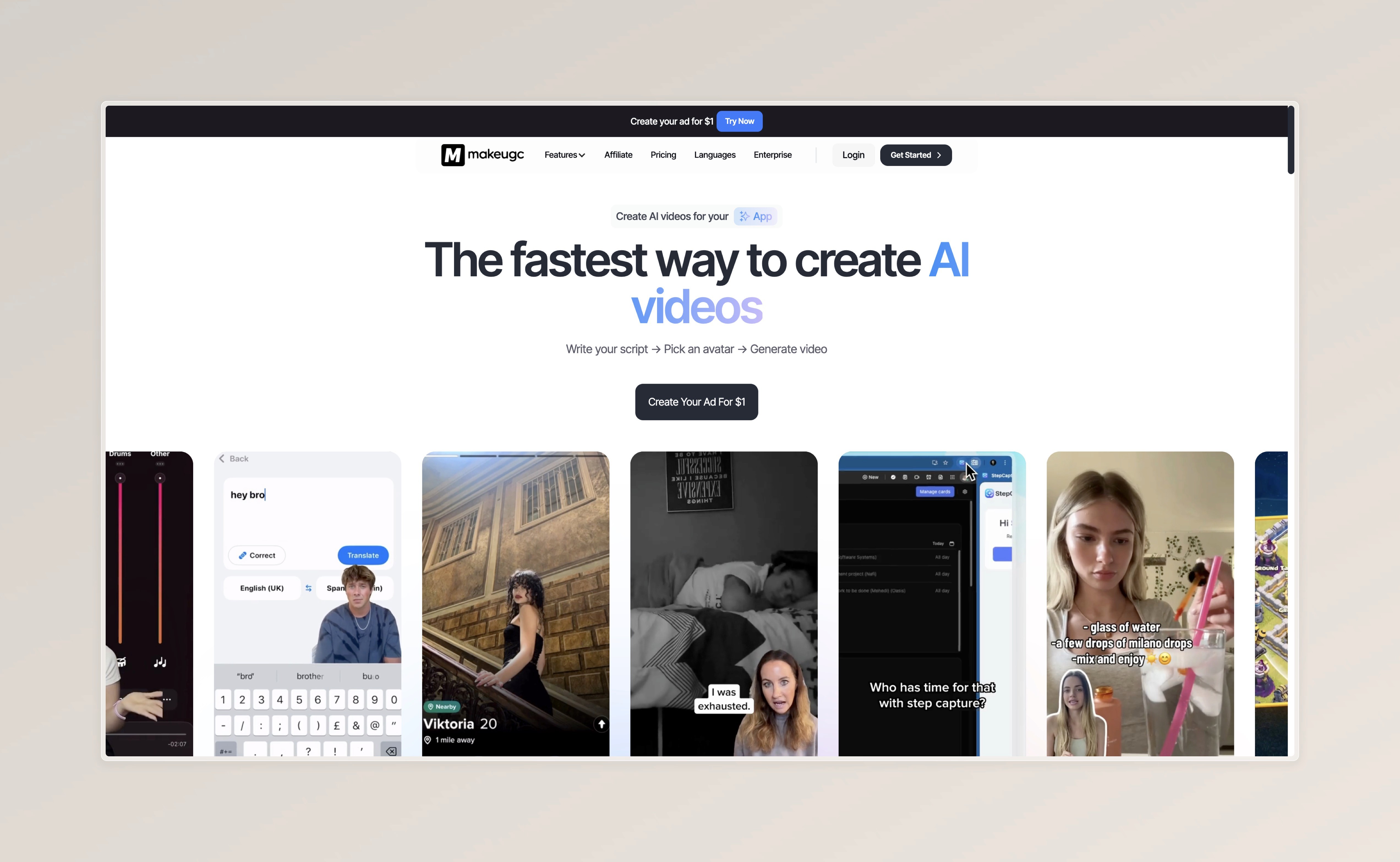
TL;DR: MakeUGC offers an affordable entry point into AI UGC with solid avatar options. However, missing editing tools and a frustrating refund policy limit its value. Teams looking for an all-in-one solution that goes beyond a simple AI UGC Clips generator will find more functionality at comparable pricing with Superscale.


What is MakeUGC?
What is MakeUGC?
What is MakeUGC?
MakeUGC is an AI platform for creating UGC-style video ads with digital avatars. The software generates authentic-looking testimonials and product reviews without booking real creators.
The platform primarily targets e-commerce brands and performance marketing teams that regularly need fresh creatives for organic social. With entry pricing starting at $49/month, MakeUGC positions itself in the budget segment of AI UGC tools.
MakeUGC's Strengths
MakeUGC's Strengths
MakeUGC's Strengths

Affordable Entry Price
At $29/month for 5 videos, MakeUGC offers one of the cheapest entry points into AI UGC. This makes the platform particularly attractive for startups and small teams looking to gain initial experience with AI-generated ads.

Affordable Entry Price
At $29/month for 5 videos, MakeUGC offers one of the cheapest entry points into AI UGC. This makes the platform particularly attractive for startups and small teams looking to gain initial experience with AI-generated ads.

Affordable Entry Price
At $29/month for 5 videos, MakeUGC offers one of the cheapest entry points into AI UGC. This makes the platform particularly attractive for startups and small teams looking to gain initial experience with AI-generated ads.

Diverse Avatar Selection
MakeUGC offers a wide selection of AI avatars across different ethnicities, age groups, and styles. This diversity allows brands to target different demographics and test various brand personalities.

Diverse Avatar Selection
MakeUGC offers a wide selection of AI avatars across different ethnicities, age groups, and styles. This diversity allows brands to target different demographics and test various brand personalities.

Diverse Avatar Selection
MakeUGC offers a wide selection of AI avatars across different ethnicities, age groups, and styles. This diversity allows brands to target different demographics and test various brand personalities.

Quick Video Generation
The platform generates videos within minutes. The script-to-video workflow is straightforward and requires no technical expertise, allowing even marketing beginners to become productive quickly.

Quick Video Generation
The platform generates videos within minutes. The script-to-video workflow is straightforward and requires no technical expertise, allowing even marketing beginners to become productive quickly.

Quick Video Generation
The platform generates videos within minutes. The script-to-video workflow is straightforward and requires no technical expertise, allowing even marketing beginners to become productive quickly.
MakeUGC's Weaknesses: Where It Falls Short
While MakeUGC works for basic avatar generation, several limitations become apparent with more intensive use.
1. No Built-In Editing Features
MakeUGC only delivers the raw avatar video. Text overlays, captions, music, or B-roll must be added in external tools like CapCut or Premiere. This means additional subscriptions and more time spent on every single ad.
2. Problematic Refund Policy
The "Risk-Free" messaging contradicts the actual refund practice. Users report denied refunds and lengthy support processes.
One user describes their experience: After creating a single video, the refund was denied despite quality not meeting expectations. Support only responded after multiple follow-ups and pointed to the policy that refunds aren't possible after video generation.
3. Inconsistent Quality
Avatar quality varies significantly. While some avatars look natural, others suffer from poor lip-sync or robotic movements.
Users share their frustration in online discussions: The videos look completely unrealistic, lip synchronization is off, and voices sound artificial. This is particularly frustrating when credits have already been used up.
4. Credit Expiration
Unused video credits expire at the end of each billing period without exception. Additionally, editing an already generated video consumes more credits, which increases the effective cost per final ad.
MakeUGC Pricing Overview
Plan
Price/mo
Videos
Cost per Video
Start Up Plan
$49/mo
5 Videos
~$10.00
Start Up Plan
$49/mo
5 Videos
~$10.00
Start Up Plan
$49/mo
5 Videos
~$10.00
Growth Plan
$69/mo
10 Videos
~$7.00
Growth Plan
$69/mo
10 Videos
~$7.00
Growth Plan
$69/mo
10 Videos
~$7.00
Pro Plan
$119/mo
20 Videos
~$6.00
Pro Plan
$119/mo
20 Videos
~$6.00
Pro Plan
$119/mo
20 Videos
~$6.00
Note: The cheaper plans are limited – if you want to promote products in hands e.g., you'll need to upgrade to the highest plan. Factor in additional costs for editing software, music licensing, and B-roll subscriptions when calculating total production costs.
Feature
MakeUGC
Superscale
Arcads
B-Roll Integration
✓
✓
✗
B-Roll Integration
✓
✓
✗
B-Roll Integration
✓
✓
✗
Built-in Timeline Editor
✗
✓
✗
Built-in Timeline Editor
✗
✓
✗
Built-in Timeline Editor
✗
✓
✗
Music Library
✗
✓
✗
Music Library
✗
✓
✗
Music Library
✗
✓
✗
Competitor Ad Spy
✗
✓
✗
Competitor Ad Spy
✗
✓
✗
Competitor Ad Spy
✗
✓
✗
Multi-Format Export
16:9 only
9:19, 1:1, 16:9
16:9 only
Multi-Format Export
16:9 only
9:19, 1:1, 16:9
16:9 only
Multi-Format Export
16:9 only
9:19, 1:1, 16:9
16:9 only
Free Trial/Credits
first 3 days $1
Free Credits (worth $50)
✗
Free Trial/Credits
first 3 days $1
Free Credits (worth $50)
✗
Free Trial/Credits
first 3 days $1
Free Credits (worth $50)
✗
Entry Price
$49/mo
$99/mo
$100/mo
Entry Price
$49/mo
$99/mo
$100/mo
Entry Price
$49/mo
$99/mo
$100/mo
The comparison shows: MakeUGC is a pure asset generator, while platforms like Superscale cover the complete workflow from research to publishing.
Who Should Use MakeUGC?

MakeUGC works for:
Budget-conscious startups looking to gain initial AI UGC experience
Teams with existing editing workflows that only need raw avatar clips
Simple testimonial content without complex product demonstrations

MakeUGC works for:
Budget-conscious startups looking to gain initial AI UGC experience
Teams with existing editing workflows that only need raw avatar clips
Simple testimonial content without complex product demonstrations

MakeUGC works for:
Budget-conscious startups looking to gain initial AI UGC experience
Teams with existing editing workflows that only need raw avatar clips
Simple testimonial content without complex product demonstrations

MakeUGC is less suitable for:
Teams looking for an all-in-one solution (external tools remain necessary)
Brands that need consistent quality (output varies)
High-volume production (credit system gets expensive quickly)

MakeUGC is less suitable for:
Teams looking for an all-in-one solution (external tools remain necessary)
Brands that need consistent quality (output varies)
High-volume production (credit system gets expensive quickly)

MakeUGC is less suitable for:
Teams looking for an all-in-one solution (external tools remain necessary)
Brands that need consistent quality (output varies)
High-volume production (credit system gets expensive quickly)
The Verdict: Is MakeUGC Worth It?
MakeUGC offers an affordable entry into AI UGC, but the low price comes with limitations. The missing editing features, problematic refund policy, and inconsistent quality make it difficult to recommend without reservations. Even the higher plans lack features competitors offer at cheaper plans. The reduction in price per video is the main improvement you'll get from upgrading.
For teams that want everything in one platform – research tools, script generation, avatar creation, timeline editing, B-roll, music, and multi-format export – Superscale offers a more complete solution at comparable pricing. Superscale's 5,000 free credits let you test the quality before committing, something MakeUGC notably only offers partially with their $1 for 3 days trial.
MakeUGC offers an affordable entry into AI UGC, but the low price comes with limitations. The missing editing features, problematic refund policy, and inconsistent quality make it difficult to recommend without reservations. Even the higher plans lack features competitors offer at cheaper plans. The reduction in price per video is the main improvement you'll get from upgrading.
For teams that want everything in one platform – research tools, script generation, avatar creation, timeline editing, B-roll, music, and multi-format export – Superscale offers a more complete solution at comparable pricing. Superscale's 5,000 free credits let you test the quality before committing, something MakeUGC notably only offers partially with their $1 for 3 days trial.
MakeUGC offers an affordable entry into AI UGC, but the low price comes with limitations. The missing editing features, problematic refund policy, and inconsistent quality make it difficult to recommend without reservations. Even the higher plans lack features competitors offer at cheaper plans. The reduction in price per video is the main improvement you'll get from upgrading.
For teams that want everything in one platform – research tools, script generation, avatar creation, timeline editing, B-roll, music, and multi-format export – Superscale offers a more complete solution at comparable pricing. Superscale's 5,000 free credits let you test the quality before committing, something MakeUGC notably only offers partially with their $1 for 3 days trial.
Why do people switch to Superscale?
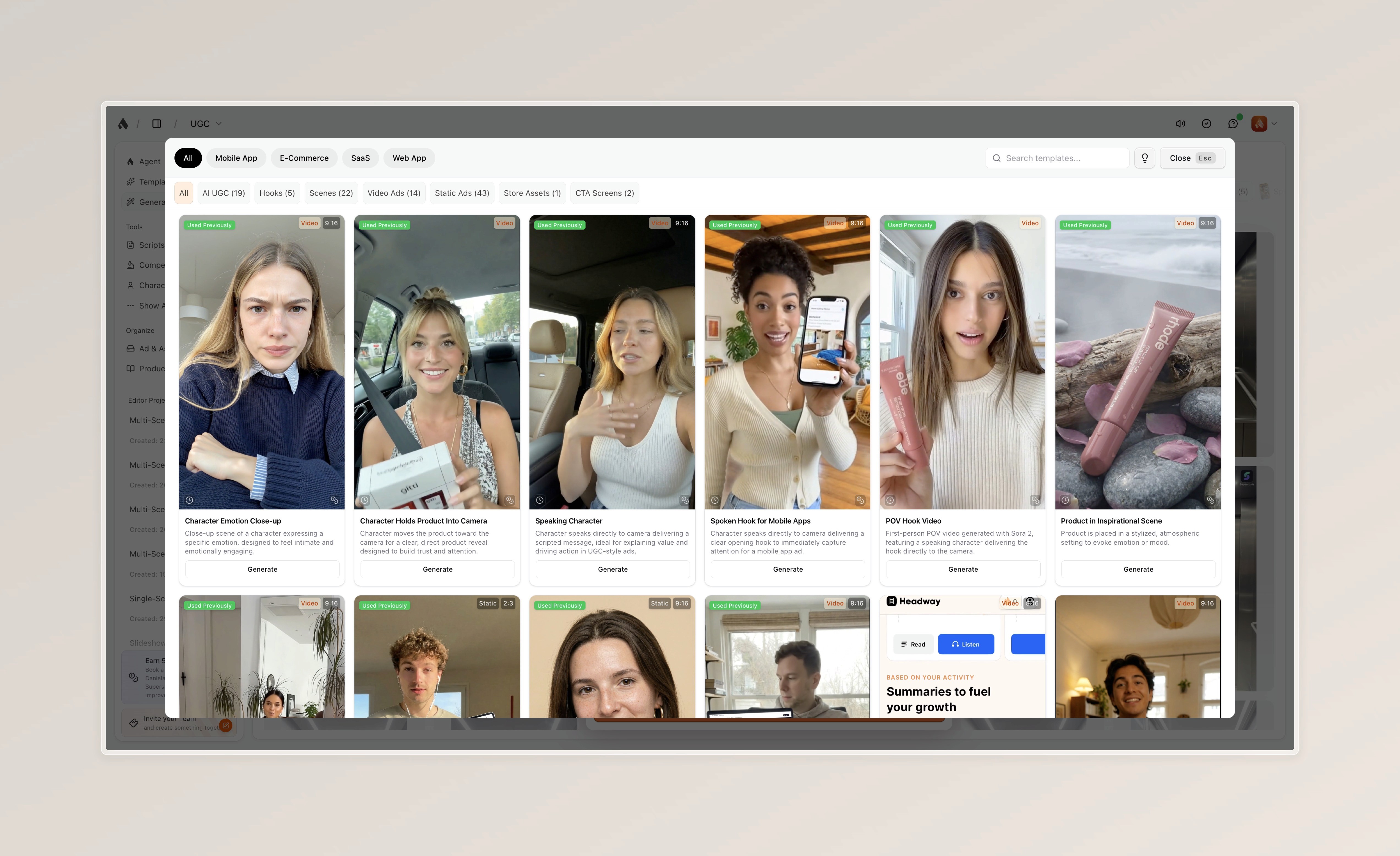
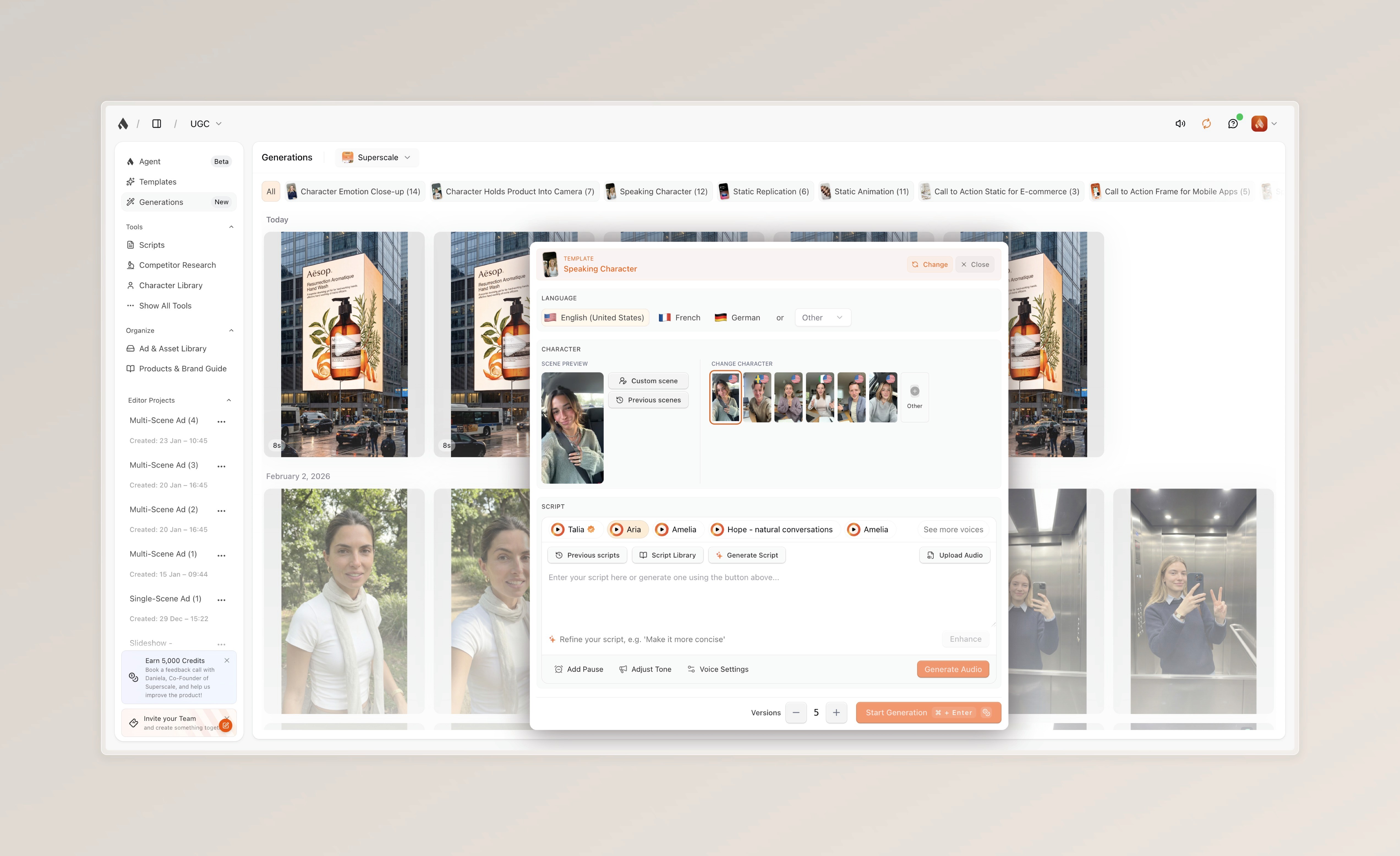


If you've been frustrated by fragmented workflows, hidden pricing, or the need to juggle multiple subscriptions just to produce a single ad, Superscale was built to solve exactly that problem.
What makes it different:
End-to-end workflow: From competitor research to published ad – no external tools needed
70+ proven templates tailored to Mobile Apps, E-Commerce, and SaaS
Built-in editor with B-roll, music, and dynamic captions
Transparent pricing with full features from day one
5,000 free credits to test before you commit (half month's subscription)
If you've been frustrated by fragmented workflows, hidden pricing, or the need to juggle multiple subscriptions just to produce a single ad, Superscale was built to solve exactly that problem.
What makes it different:
End-to-end workflow: From competitor research to published ad – no external tools needed
70+ proven templates tailored to Mobile Apps, E-Commerce, and SaaS
Built-in editor with B-roll, music, and dynamic captions
Transparent pricing with full features from day one
5,000 free credits to test before you commit (half month's subscription)
If you've been frustrated by fragmented workflows, hidden pricing, or the need to juggle multiple subscriptions just to produce a single ad, Superscale was built to solve exactly that problem.
What makes it different:
End-to-end workflow: From competitor research to published ad – no external tools needed
70+ proven templates tailored to Mobile Apps, E-Commerce, and SaaS
Built-in editor with B-roll, music, and dynamic captions
Transparent pricing with full features from day one
5,000 free credits to test before you commit (half month's subscription)
→ Try Superscale for free and see why teams are switching from fragmented tools to a complete ad creation platform.
Read Next
More Reviews

Arcads Review 2026
The only Arcads review you'll ever need for 2026


Creatify Review 2026
The only Creatify review you'll ever need for 2026


AdCreative.ai Review 2026
The only AdCreative.ai review you'll ever need for 2026


ReelFarm Review 2026
The only ReelFarm review you'll ever need for 2026


Synthesia Review 2026
The only Synthesia review you'll ever need for 2026


HeyGen Review 2026
The only HeyGen review you'll ever need for 2026
FAQ
Get answers to the most asked questions
Which tool is the most cost-effective for scaling ads?
If you are looking for transparent pricing, Superscale is the winner. It avoids hidden paywalls for essential features (like ElevenLabs voices or custom characters) and includes multi-brand support on all plans. Its "Starter Plan" ($99/mo) offers significant volume, and its conversational guidance ensures you waste fewer credits on failed generations compared to the trial-and-error approach of other platforms.
Which tool is the most cost-effective for scaling ads?
If you are looking for transparent pricing, Superscale is the winner. It avoids hidden paywalls for essential features (like ElevenLabs voices or custom characters) and includes multi-brand support on all plans. Its "Starter Plan" ($99/mo) offers significant volume, and its conversational guidance ensures you waste fewer credits on failed generations compared to the trial-and-error approach of other platforms.
Which tool is the most cost-effective for scaling ads?
If you are looking for transparent pricing, Superscale is the winner. It avoids hidden paywalls for essential features (like ElevenLabs voices or custom characters) and includes multi-brand support on all plans. Its "Starter Plan" ($99/mo) offers significant volume, and its conversational guidance ensures you waste fewer credits on failed generations compared to the trial-and-error approach of other platforms.
Which platform is best for E-Commerce or App owners?
Superscale is specifically tailored for these niches. Unlike generic generators, Superscale offers over 70 proven ad templates designed specifically for Mobile Apps, E-Commerce stores, and SaaS Web Apps. It uses your specific ICP (Ideal Customer Profile) and USP (Unique Selling Proposition) data to generate scripts that actually convert.
Which platform is best for E-Commerce or App owners?
Superscale is specifically tailored for these niches. Unlike generic generators, Superscale offers over 70 proven ad templates designed specifically for Mobile Apps, E-Commerce stores, and SaaS Web Apps. It uses your specific ICP (Ideal Customer Profile) and USP (Unique Selling Proposition) data to generate scripts that actually convert.
Which platform is best for E-Commerce or App owners?
Superscale is specifically tailored for these niches. Unlike generic generators, Superscale offers over 70 proven ad templates designed specifically for Mobile Apps, E-Commerce stores, and SaaS Web Apps. It uses your specific ICP (Ideal Customer Profile) and USP (Unique Selling Proposition) data to generate scripts that actually convert.
Does MakeUGC offer free trials?
MakeUGC has limited free testing. Laria's free tier is very restricted. Superscale allows you to try before you commit by gifting you 5,000 credits upon sign-up—equivalent to roughly half a month's subscription value—so you can properly evaluate the quality and workflow.
Does MakeUGC offer free trials?
MakeUGC has limited free testing. Laria's free tier is very restricted. Superscale allows you to try before you commit by gifting you 5,000 credits upon sign-up—equivalent to roughly half a month's subscription value—so you can properly evaluate the quality and workflow.
Does MakeUGC offer free trials?
MakeUGC has limited free testing. Laria's free tier is very restricted. Superscale allows you to try before you commit by gifting you 5,000 credits upon sign-up—equivalent to roughly half a month's subscription value—so you can properly evaluate the quality and workflow.
Does Superscale support batch generation like MakeUGC?
Yes. Superscale offers one-click generation of multiple ad variations. But unlike MakeUGC which only outputs raw clips, Superscale generates complete, ready-to-publish ads with templates tailored for Mobile Apps, E-Commerce, and SaaS. You can also iterate and edit directly in the platform.
Does Superscale support batch generation like MakeUGC?
Yes. Superscale offers one-click generation of multiple ad variations. But unlike MakeUGC which only outputs raw clips, Superscale generates complete, ready-to-publish ads with templates tailored for Mobile Apps, E-Commerce, and SaaS. You can also iterate and edit directly in the platform.
Does Superscale support batch generation like MakeUGC?
Yes. Superscale offers one-click generation of multiple ad variations. But unlike MakeUGC which only outputs raw clips, Superscale generates complete, ready-to-publish ads with templates tailored for Mobile Apps, E-Commerce, and SaaS. You can also iterate and edit directly in the platform.
Why shouldn't I just stick with MakeUGC for batch generation?
If you only need raw talking-head clips and have your own editing workflow, MakeUGC works fine. However, MakeUGC only generates the raw video file—you still need external software to add music, captions, B-roll, and hooks. Superscale allows you to generate AND finish your ads in one platform, saving significant time and tool-switching.
Why shouldn't I just stick with MakeUGC for batch generation?
If you only need raw talking-head clips and have your own editing workflow, MakeUGC works fine. However, MakeUGC only generates the raw video file—you still need external software to add music, captions, B-roll, and hooks. Superscale allows you to generate AND finish your ads in one platform, saving significant time and tool-switching.
Why shouldn't I just stick with MakeUGC for batch generation?
If you only need raw talking-head clips and have your own editing workflow, MakeUGC works fine. However, MakeUGC only generates the raw video file—you still need external software to add music, captions, B-roll, and hooks. Superscale allows you to generate AND finish your ads in one platform, saving significant time and tool-switching.
What are the best alternatives to MakeUGC in 2026?
The top alternatives currently include Superscale, Laria, and ReelFarm. While Laria offers automated editing at a high per-video cost and ReelFarm provides cheap slideshows without speaking avatars, Superscale is the most comprehensive alternative. It includes the batch generation MakeUGC is known for, but adds full editing tools, diverse ad formats, and a complete workflow.
What are the best alternatives to MakeUGC in 2026?
The top alternatives currently include Superscale, Laria, and ReelFarm. While Laria offers automated editing at a high per-video cost and ReelFarm provides cheap slideshows without speaking avatars, Superscale is the most comprehensive alternative. It includes the batch generation MakeUGC is known for, but adds full editing tools, diverse ad formats, and a complete workflow.
What are the best alternatives to MakeUGC in 2026?
The top alternatives currently include Superscale, Laria, and ReelFarm. While Laria offers automated editing at a high per-video cost and ReelFarm provides cheap slideshows without speaking avatars, Superscale is the most comprehensive alternative. It includes the batch generation MakeUGC is known for, but adds full editing tools, diverse ad formats, and a complete workflow.
PLAY
00:00:00


AI AD Company
Need more support?
We partner with selected companies with significant social ad spend and ambition through our managed account program. So you can mind your own business.
PLAY
00:00:00


AI AD Company
Need more support?
We partner with selected companies with significant social ad spend and ambition through our managed account program. So you can mind your own business.
PLAY
00:00:00


AI AD Company
Need more support?
We partner with selected companies with significant social ad spend and ambition through our managed account program. So you can mind your own business.
©2026 Superscale
SOLUTIONS
COMPARE
An
AI Ads Company
product
An
AI Ads Company
product
SOLUTIONS
COMPARE
©2025 Superscale
An
AI Ads Company
product
SOLUTIONS
COMPARE
©2025 Superscale